Aziz

Things to Consider Before Choosing Embroidery Service Near Me

Things to Consider Before Choosing Embroidery Service in USA

Embroidery has the power to transform a simple piece of fabric into something memorable—whether it’s a branded company uniform, personalized merchandise, or a unique piece of art. But how do you ensure your project comes out perfectly? The key lies in choosing the right embroidery service. At Punch Digitizing, we’ve worked with countless embroidery projects, from small businesses to large-scale orders. Here are the crucial things you should consider when selecting an embroidery service in USA to make sure you get results that exceed your expectations. Quality is Everything When it comes to embroidery, quality can’t be compromised. The difference between a great embroidery service and a mediocre one is in the details—clean stitches, vibrant thread colors, and a finish that holds up after washing. You don’t want to end up with loose threads, inconsistent stitching, or fading designs. How can you be sure about quality? Always ask to see samples of the service’s previous work. Whether it’s a logo, a complex design, or intricate lettering, high-quality embroidery should look neat and professional. If the service offers digitizing, even better! This ensures your design is translated precisely from digital to fabric. Experience Brings Expertise Experience in the embroidery business is an essential ingredient for success. A service with years of practice knows how to handle a wide range of fabrics, stitching techniques, and design challenges. If you’re working with special materials or intricate designs, experience matters. Choosing an embroidery provider with a strong track record will save you from potential headaches. It’s not just about stitching; an experienced team can offer helpful advice on what works best for your specific project, helping you avoid common pitfalls. Look for a Service that Fits Your Needs Not all embroidery services are the same, and some are better suited for certain projects than others. Some specialize in custom apparel, while others focus on large-scale corporate orders or intricate personal designs. Understanding what services they offer is key to making sure they can handle your order—whether it’s a simple monogram or a detailed logo with multiple colors. It’s always a good idea to ask whether they offer additional services, like digitizing. Digitizing is the process of converting your design into a stitchable file, which is crucial for achieving the perfect final product. Some embroidery services also offer custom design work, allowing you to tweak your concept before it hits the machine. Don’t Underestimate Turnaround Time Got a tight deadline? Whether you’re ordering embroidered uniforms for a company event or promotional items for a product launch, turnaround time can be a make-or-break factor. Some services can deliver fast, but speed shouldn’t come at the expense of quality. Before committing, ask the service about their usual turnaround time and if they can meet your deadline without cutting corners. Some companies offer rush services, but always make sure to clarify if this option impacts the quality of the final product. Transparent Pricing is Key Embroidery pricing can vary depending on factors like design complexity, thread colors, and the number of stitches involved. Hidden costs can sneak in if you’re not careful—setup fees, digitizing costs, or extra charges for larger designs. To avoid surprises, request a detailed quote upfront. A transparent embroidery service will happily break down the costs for you and explain how they calculate pricing, whether it’s based on stitch count, design size, or thread color. Keep in mind that while it’s tempting to choose the cheapest option, price should always align with the quality you expect. Communication is Crucial When working on a custom project, good communication can make all the difference. A service that listens to your needs, answers your questions, and keeps you updated throughout the process is one worth choosing. Miscommunication or lack of attention can result in incorrect designs, wrong colors, or disappointing results. Look for a provider that is easy to reach, responsive, and willing to discuss your project in detail. Having someone walk you through the process or offer design feedback ensures that the final product meets your expectations. Reviews Speak Volumes Nothing gives you better insight into a company’s performance than reviews from previous customers. Take the time to search for reviews on Google, social media, or other third-party platforms to see how the embroidery service fares in terms of quality, customer service, and reliability. Were customers happy with their finished products? Did the company meet deadlines? Were there any issues with design execution? Reviews often reveal details that can help you decide whether this is the right service for you. Location and Shipping Flexibility While many top-notch embroidery services operate across the USA, considering the location can play a role if timing is crucial. Local services can sometimes offer quicker turnaround, as you eliminate potential shipping delays. However, many high-quality providers offer reliable nationwide shipping, so don’t hesitate to choose a non-local company if they meet your needs. Always ask about shipping options, especially if you need to get products delivered by a specific date. Some companies offer free or discounted shipping for larger orders, so it’s worth checking if that’s an option. Sustainable and Ethical Practices More and more people are considering the environmental impact of their purchases, and embroidery services are no exception. If sustainability is important to you, check whether the service uses eco-friendly materials, follows sustainable practices, or offers ethically sourced threads. Many embroidery providers now offer organic fabrics or use processes that minimize waste. If you’re interested in sustainability, make sure to ask the service about their environmental practices before making a decision. Conclusion: Choose Wisely for Embroidery Success Choosing an embroidery service in the USA can be a game-changer for your project, whether it’s a single custom T-shirt or a large bulk order. Focus on finding a provider that offers the quality, experience, and communication you need to get the job done right. Contact Punch Digitizing, we make sure every stitch is perfect. Whether you need custom designs, quick turnaround, or expert digitizing services, we’re here to make your embroidery

Things to Consider Before Choosing Embroidery Service in USA Read More »

What Is Embroidery? | Embroidery Definition and History

Embroidery Definition – More Than Just Thread and Fabric

Embroidery—what comes to mind? Maybe you picture an old-fashioned technique used for monograms on towels or logos on uniforms. While those are classic examples, embroidery is so much more than simply stitching fabric. At its core, it’s an art form that has evolved over centuries, blending tradition with innovation. So, what’s the true embroidery definition? Let’s dive with Punch Digitizing into the meaning, history, and why this timeless craft still captures imaginations today. What Is Embroidery? Simply put, embroidery is the craft of decorating fabric or other materials using a needle to apply thread or yarn. But calling it “decorating with thread” doesn’t do justice to the intricate, often breathtaking designs embroidery can create. From simple initials to complex, hand-stitched masterpieces, embroidery transforms ordinary fabric into something extraordinary. The word “embroidery” itself comes from the Old French word “broderie,” meaning embellishment. And that’s exactly what embroidery does—it embellishes, elevating plain materials into personalized, artful creations. The Basic Definition At its most basic, embroidery involves: Needle: The tool used to pull thread through fabric to create stitches. Thread or Yarn: The material used to create the design. This can vary from traditional cotton floss to metallic or silk threads. Fabric: The surface where the embroidery takes place. While most embroidery is done on fabric, it can also be done on other materials like leather, paper, or even wood. But within this simplicity lies an art form that has been evolving for thousands of years. A Timeless Art: The History of Embroidery Embroidery has been practiced for centuries in cultures across the world, from ancient Egypt and China to medieval Europe. In fact, the earliest known examples of embroidery date back to around 30,000 B.C., where fossilized remains of embroidered clothing were discovered in Russia. Historically, embroidery was not only decorative but a marker of status. Royalty and nobility wore heavily embroidered garments, with gold and silver threads often used to signify wealth and power. In different regions, specific types of embroidery, like Chinese silk embroidery or European tapestry work, became known for their intricate craftsmanship and unique styles. Today, embroidery is no longer reserved for the elite; it’s a craft accessible to everyone, blending tradition with modern technology. Modern Embroidery Defination: From Hand to Machine While hand embroidery is still widely practiced, modern embroidery also includes machine embroidery. This is where technology steps in to simplify and speed up the process, making it easier to replicate designs with precision. Hand Embroidery: Involves carefully stitching designs by hand, one thread at a time. Hand embroidery gives each piece a personal, unique touch, with subtle variations that make each design special. Machine Embroidery: Uses automated machines to stitch designs onto fabric. Machine embroidery is ideal for creating consistent, high-volume designs, like logos or patterns for clothing brands. At Punch Digitizing, we combine the art of embroidery with the precision of technology, turning your designs into custom digitized files that machine embroidery can bring to life. Embroidery Stitches: More Than Just Thread To truly understand embroidery, you have to look at the stitches that make up each design. There are dozens of stitch types, each with its own unique texture, look, and purpose. Some of the most common embroidery stitches include: Running Stitch: A basic stitch often used for outlines. Satin Stitch: Fills in areas with smooth, closely placed stitches, creating a polished surface. Backstitch: Provides a neat, continuous line, often used for writing text in embroidery. French Knot: Adds dimension and texture with small, raised knots. Cross Stitch: A popular counted-thread stitch that forms an “X” on the fabric. Each of these stitches serves a different purpose in creating a design, and mastering them is part of the joy of embroidery. Whether hand-stitched or machine-made, the careful choice of stitch impacts the final look and feel of the piece. Embroidery as an Expression of Creativity At its heart, embroidery is more than just a craft—it’s a way to express creativity. Whether you’re stitching a simple monogram onto a shirt or designing an intricate floral pattern, embroidery lets you bring your ideas to life in a tactile, lasting way. Even in today’s fast-paced world, embroidery remains relevant. From fashion designers incorporating embroidered elements into high-end couture, to hobbyists creating handmade gifts, the possibilities are endless. Embroidery has moved beyond its traditional role as decoration—it’s become a form of personal and artistic expression. Embroidery Trends: Where Tradition Meets Innovation In recent years, embroidery has surged in popularity, especially as a DIY craft. Thanks to social media platforms like Instagram and Pinterest, there’s a growing community of embroiderers sharing their work and inspiring others to pick up a needle and thread. Some of the latest trends in embroidery include: 3D Embroidery: Using techniques like 3d puff embroidery or layered stitches to create a three-dimensional effect. Appliqué Embroidery: Combining fabric pieces with embroidery to add texture and layers to the design. Minimalist Embroidery: Simple, clean designs that focus on outlines and subtle details, perfect for a modern aesthetic. Sustainable Embroidery: Using eco-friendly materials like organic cotton thread and upcycled fabrics to create conscious designs. With modern tools and technology, embroidery has become even more versatile. For example, businesses use embroidery to brand corporate apparel, and individuals create personalized gifts that leave a lasting impression. Conclusion: Embroidery—A Craft that Endures So, what is embroidery? It’s the art of decorating fabric with thread, but more importantly, it’s a craft that has stood the test of time. From ancient hand-stitched designs to modern machine-made logos, embroidery continues to captivate people around the world. Whether you’re diving into embroidery as a hobby or looking for professional results for a business or event, embroidery offers a unique, creative way to make a statement. Contact Punch Digitizing, you can bring your vision to life with precision and artistry.

Embroidery Definition – More Than Just Thread and Fabric Read More »

How to Avoid Common Mistakes When Designing a Custom T-shirt | PunchDigitizing

How to Avoid Common Mistakes When Designing A Custom T-Shirt!

Designing a custom T-shirt can be a fun and creative process, but it’s easy to make mistakes along the way that could ruin the final product. Whether you’re creating T-shirts for personal use, business branding, or an event, getting the design right is key. With a few simple tips, you can avoid common pitfalls and make sure your custom T-shirt turns out exactly how you envision. At Punch Digitizing, we help you bring your custom T-shirt designs to life, ensuring your vision translates perfectly to fabric. Here’s how to avoid the most common mistakes people make when designing custom T-shirts. 1. Not Choosing the Right Fabric The fabric you choose for your custom T-shirt makes a big difference in how your design looks and feels. One of the most common mistakes is picking a fabric that doesn’t match your design or purpose. Cotton: Best for casual T-shirts, breathable, and great for everyday wear. Polyester: Ideal for performance wear, quick-drying, and moisture-wicking. Blends: Cotton-poly blends provide the best of both worlds—comfort and durability. Avoid This Mistake: Think about the purpose of your T-shirt. If it’s for athletic use, opt for polyester or a moisture-wicking blend. For casual, everyday shirts, cotton works best. Always match the fabric to your design’s needs. 2. Ignoring Color Contrast One of the biggest mistakes in custom T-shirt design is ignoring how colors work together. If your design blends into the background color of the shirt, it won’t stand out the way you want it to. On the flip side, too many bright colors can clash and make the design hard to read. Avoid This Mistake: Use contrasting colors that make your design pop. For example, if your T-shirt is dark, use lighter colors in your design, and if the shirt is light, go for darker, bolder design elements. Pro Tip: Always test your color combinations on-screen and in print to see how they will appear on fabric. 3. Using Low-Resolution Images Nothing ruins a custom T-shirt design faster than using low-quality or pixelated images. When your design gets printed on a T-shirt, any image with a low resolution will appear blurry and unprofessional. Avoid This Mistake: Always use high-resolution images when creating your design. Aim for at least 300 DPI (dots per inch) to ensure the design looks sharp and crisp when printed. If you’re using artwork or logos, make sure they’re in vector format (.AI or .EPS) for the best results. 4. Overcomplicating the Design It’s tempting to pack as much as you can into your T-shirt design, but less is often more. Overcomplicating your design with too many elements, fonts, or colors can make the final product look cluttered and hard to read. Avoid This Mistake: Focus on simplicity and clarity. Choose one or two key design elements and stick to a consistent color palette. Remember, a clean and simple design can often make a bigger impact than an overly complex one. Pro Tip: Try digitizing your design (internal link to digitizing services) before printing. This helps streamline the process and ensures the final design translates well onto fabric. 5. Choosing the Wrong Print Placement Where you place your design on the T-shirt can make or break the look. A common mistake is placing the design too high, too low, or off-center. This can lead to awkward-looking shirts that don’t have the professional feel you’re aiming for. Avoid This Mistake: Follow standard design placement guidelines. For example, for chest designs, place the design about 3–4 inches below the neckline. For larger designs, center them evenly on the shirt. If you’re designing for a specific event or purpose, think about how the placement will look when the shirt is worn. 6. Overlooking the Shirt Size Designing without considering different shirt sizes is another common mistake. If your design is perfectly sized for a medium but looks too small on an extra-large or too big on a small shirt, it can affect the overall look. Avoid This Mistake: Make sure your design scales well across all shirt sizes. Test how the design looks on various sizes to ensure consistency and a good fit for everyone wearing the T-shirt. 7. Forgetting About the Audience Another mistake is not designing with your audience in mind. Are you creating shirts for a business, an event, or personal use? If your design doesn’t resonate with your target audience, your shirts may not have the impact you’re hoping for. Avoid This Mistake: Think about who will be wearing the shirt. Is it for a casual event? A corporate uniform? Or a fun, personal project? Tailor the design style, colors, and message to appeal directly to your audience. 8. Not Checking for Typos It sounds simple, but many T-shirt designs have been ruined by a single typo. Whether it’s a brand name, slogan, or event date, having a mistake on your custom T-shirt can be embarrassing and costly to fix. Avoid This Mistake: Proofread your design carefully. Double-check all spelling, dates, and important details before finalizing the design for printing. 9. Ignoring Printing Method Limitations Not all printing methods are created equal, and some may not be suitable for certain types of designs. For instance, designs with gradients, intricate details, or a lot of colors may not work well with screen printing but might be better suited for digital printing. Avoid This Mistake: Understand the limitations of your chosen printing method. If you’re unsure, consult with your printer or embroidery digitizing service provider to ensure your design will print well with the method you’ve selected. 10. Not Getting a Test Print Finally, one of the most common and costly mistakes is skipping the test print. Even if everything looks perfect on your screen, the final product may not turn out the way you expect once printed on fabric. Avoid This Mistake: Always get a test print before committing to a full run. This lets you catch any last-minute errors and see how the design looks and feels on the shirt itself. Conclusion:

How to Avoid Common Mistakes When Designing A Custom T-Shirt! Read More »

8 Different Types of Fabrics You Should Know | Punchdigitzing

8 Different Types Of Fabrics

Choosing the right fabric is essential for any project, whether you’re sewing a garment, designing home décor, or creating custom embroidery. Each fabric has unique properties that make it suitable for specific uses, from breathable cotton to luxurious silk. But with so many options, how do you know which fabric to choose? At Punch Digitizing, we understand the importance of selecting the best fabric for your project. In this guide, we’ll explore the different types of fabrics, their characteristics, and when to use them. By the end, you’ll have a better idea of which fabric will work best for your next creation. 1. Cotton: The Everyday Essential Cotton is one of the most popular and versatile fabrics in the world. It’s a natural fiber that’s soft, breathable, and comfortable, making it ideal for everything from casual wear to bed linens. Cotton is also durable and easy to care for, which is why it’s a go-to fabric for so many projects. Best for: Everyday clothing, T-shirts, casual dresses, quilting, and home décor. Properties: Breathable, soft, durable, and machine-washable. Pro Tip: Cotton fabric is perfect for beginners because it’s easy to sew and works well with a variety of stitching techniques. 2. Polyester: The Performance Fabric Polyester is a synthetic fabric known for its strength and durability. It’s resistant to shrinking and stretching, making it a popular choice for activewear and outdoor gear. Polyester fabrics often have moisture-wicking properties, keeping you dry during physical activity. Best for: Activewear, sports jerseys, outdoor apparel, and bags. Properties: Strong, wrinkle-resistant, moisture-wicking, and quick-drying. Pro Tip: Polyester blends (like cotton-poly) combine the softness of cotton with the durability of polyester, making them ideal for everyday wear. 3. Silk: The Luxurious Choice Silk is a natural protein fiber that’s prized for its luxurious feel and beautiful sheen. It’s soft, lightweight, and has a natural luster that makes it perfect for special occasions and high-end garments. While it’s more delicate than other fabrics, silk’s elegance is unmatched. Best for: Formal wear, evening gowns, lingerie, and scarves. Properties: Smooth, lightweight, shiny, and luxurious. Pro Tip: Silk can be tricky to sew because of its delicate nature, so be sure to use sharp needles and handle it with care. 4. Wool: The Cozy Fabric Wool is a natural fiber obtained from sheep, known for its warmth and durability. It’s a great insulator, making it perfect for winter clothing and accessories. Wool fabrics are also naturally resistant to wrinkles and moisture, making them a reliable option for outerwear. Best for: Sweaters, coats, scarves, and blankets. Properties: Warm, moisture-resistant, and insulating. Pro Tip: Wool can be itchy on bare skin, so consider using wool blends or adding a lining to your garments for added comfort. 5. Linen: The Cool and Crisp Option Linen is a natural fabric made from flax fibers. It’s known for its cool, crisp feel, which makes it perfect for warm weather. Linen is highly breathable and moisture-wicking, so it’s ideal for summer clothing and light, airy home décor. However, it does tend to wrinkle easily. Best for: Summer clothing, lightweight suits, table linens, and curtains. Properties: Breathable, moisture-wicking, and cool to the touch. Pro Tip: Pre-wash linen before using it to prevent shrinkage later, as linen fabrics can shrink significantly after the first wash. 6. Rayon: The Versatile Synthetic Rayon is a semi-synthetic fabric made from cellulose fibers. It’s known for its versatility, as it can mimic the feel of silk, cotton, or wool depending on how it’s made. Rayon is soft, breathable, and drapes beautifully, making it a popular choice for a wide range of garments. Best for: Dresses, blouses, skirts, and drapery. Properties: Soft, breathable, lightweight, and drapey. Pro Tip: Rayon is prone to shrinking and wrinkling, so it’s best to hand wash or dry clean garments made from this fabric. 7. Denim: The Durable Classic Denim is a sturdy cotton fabric that’s known for its durability and rugged appearance. Most commonly used for jeans, denim has a distinctive twill weave that makes it long-lasting and tough. It’s a favorite for casual wear and workwear alike, providing both style and function. Best for: Jeans, jackets, overalls, and bags. Properties: Durable, rugged, and resistant to wear and tear. Pro Tip: Use thicker needles when sewing denim to handle the heavy fabric layers without breaking. 8. Velvet: The Plush and Elegant Fabric Velvet is a luxurious fabric with a soft, plush texture. It’s often associated with formal wear and opulence, making it a great choice for elegant evening gowns or home décor. Velvet adds richness and depth to any project, and it’s available in a variety of styles, including crushed velvet and stretch velvet. Best for: Evening wear, upholstery, and decorative pillows. Properties: Soft, plush, and luxurious. Pro Tip: Velvet can be tricky to sew due to its pile, so take your time and use a walking foot on your sewing machine to prevent the fabric from shifting. 9. Chiffon: The Delicate and Flowing Fabric Chiffon is a lightweight, sheer fabric with a soft, flowing drape. It’s often used in bridal wear, evening dresses, and elegant blouses. Chiffon’s delicate texture requires careful handling, but it adds a graceful, airy quality to any project. Best for: Bridal gowns, formal dresses, scarves, and blouses. Properties: Lightweight, sheer, and flowy. Pro Tip: Use fine needles and a gentle touch when sewing chiffon to avoid snagging or tearing the delicate fabric. 10. Fleece: The Warm and Cozy Fabric Fleece is a synthetic fabric that’s popular for its warmth and softness. It’s often used for casual outerwear, blankets, and cozy loungewear. Fleece is lightweight yet insulating, making it a great choice for cold-weather projects. Best for: Jackets, blankets, and activewear. Properties: Warm, soft, lightweight, and moisture-wicking. Pro Tip: Fleece doesn’t fray, so you can leave the edges unfinished for certain projects, like blankets, to save time. Conclusion: Choose the Right Fabric for Your Next Project Each fabric has its own unique properties that make it suitable for different types of projects. Whether

8 Different Types Of Fabrics Read More »

iron on transfer paper

How to Use Iron-On Transfer Paper: A Step-by-Step Guide

If you’re looking for a fun and easy way to customize clothing, bags, or home décor, iron-on transfer paper is the perfect tool to achieve professional-looking results right from home. Whether you’re crafting for personal use or making customized products for your business, knowing how to use iron-on transfer paper can save you time and money while unleashing your creativity. In this blog, Explore the step-by-step process of using iron-on transfer paper and some helpful tips to ensure flawless results every time with Punch Digitizing. What is Iron-On Transfer Paper? Iron-on transfer paper is a special type of paper designed to transfer printed designs onto fabrics and other surfaces using the heat from an iron. The process is simple: you print your design onto the transfer paper using an inkjet or laser printer, then use an iron to transfer the image onto the desired fabric or surface. It’s a fantastic way to customize t-shirts, tote bags, aprons, and more. The real beauty of iron-on transfer paper is its versatility. You can create everything from simple text designs to intricate artwork, and the process works well on both light and dark-colored fabrics, depending on the type of transfer paper used. Step-by-Step Guide on How to Use Iron-On Transfer Paper Now, let’s walk through how to use iron-on transfer paper in a few simple steps. Step 1: Gather Your Materials Before you start, you’ll need a few key materials: Iron-on Transfer Paper (choose the type suited for light or dark fabrics) A printer (either inkjet or laser, depending on the paper’s instructions) A design (this can be a custom graphic, photo, or text) A pair of scissors A t-shirt or another fabric item A hard, flat surface (like an ironing board or table) A household iron Parchment paper (optional, often used with dark transfer paper) Ensure that your fabric is clean and smooth. Avoid using wrinkled or dirty items, as this could affect the final transfer. Step 2: Choose and Print Your Design Once you’ve gathered your materials, it’s time to choose your design. Whether you’re creating a personal logo, a photo, or an inspiring quote, make sure the design looks the way you want it to appear on the fabric. Mirror the Image for Light Fabrics: If you’re working with light-colored fabrics and using transfer paper meant for light colors, you will need to mirror or flip the design before printing. This ensures that the image prints in reverse, and when applied to the fabric, it appears correctly. Keep the Image as Is for Dark Fabrics: For dark-colored fabrics, you do not need to mirror the image. Once you’re ready, load the transfer paper into your printer. Be sure to print on the correct side of the paper. Follow the instructions provided by the manufacturer regarding print settings (inkjet vs. laser). Step 3: Cut Out the Design After printing your design, use scissors to carefully cut around the image. Try to leave as little excess paper as possible, as any blank areas of transfer paper will also transfer onto your fabric and may leave unwanted lines or markings. For intricate designs, you can use a craft knife or cutting machine to achieve more precise cuts. Step 4: Prepare Your Fabric Lay your t-shirt or fabric item flat on a hard, heat-resistant surface. It’s important to iron out any wrinkles beforehand, as they can cause the transfer to be uneven or create creases in the design. Make sure the fabric is fully smooth and ready to receive the transfer. Step 5: Position the Transfer Paper Place your transfer paper onto the fabric, with the design side facing down (for light fabrics). For dark fabrics, place the design face-up, and use parchment paper (if provided) over the top of the transfer. Ensure that the paper is positioned exactly where you want the design to appear on the fabric. Once it’s in place, be careful not to move it around, as this could blur the design during the transfer process. Step 6: Iron the Design Now, it’s time to iron the transfer. Set your iron to the hottest setting that your fabric can tolerate (typically “Cotton” or the highest setting). Make sure the steam setting is turned off, as you only want dry heat for the transfer. For Light Fabrics: Iron directly on the back of the transfer paper in slow, steady motions. Press down firmly to ensure the heat is evenly applied. For Dark Fabrics: Place the parchment paper over the design before ironing. This helps protect the transfer and ensures even heat distribution. Iron for the recommended time (usually 2-3 minutes), but be sure to follow the specific instructions that come with your transfer paper, as times may vary depending on the brand. Step 7: Let it Cool and Peel After ironing, allow the transfer to cool for a few minutes. This is important because it gives the transfer time to adhere to the fabric properly. Once cool, slowly peel away the backing paper. Start from one corner and pull gently to reveal your design. If you notice any parts of the design lifting, re-iron the area for a few more seconds, then let it cool again before peeling. Tips for Success When Using Iron-On Transfer Paper Test First: Always test your transfer on a scrap piece of fabric before applying it to your final product. This allows you to make sure the transfer works properly and that you like the color and design. Use a Hard Surface: Avoid ironing on soft surfaces like a bed or couch. A sturdy table or counter will ensure even heat distribution. Choose the Right Paper: Be sure to choose the right type of transfer paper for your project. There are different types for light and dark fabrics, and using the wrong one can affect the final result. Proper Care: After transferring your design, allow the type of fabric to cool completely before wearing or washing it. When washing, turn the garment inside out and

How to Use Iron-On Transfer Paper: A Step-by-Step Guide Read More »

How to Vectorize an Image in Different Software

How to Vectorize an Image in Different Software

In the world of digital design, vector images are essential for creating high-quality, scalable graphics that maintain their clarity no matter the size. For businesses like Punch Digitizing, vector images play a critical role in creating designs for embroidery, promotional materials, and more. But how do you take a standard raster image (like a JPEG or PNG) and convert it into a vector format? In this blog, we’ll dive into what is vector art and the step-by-step process of how to vectorize an image using different software tools commonly used in the industry. What Does It Mean to Vectorize an Image? Before diving into the tools and techniques, let’s first understand what vectorizing an image means. Essentially, vectorizing is the process of converting a raster image (composed of pixels) into a vector image (composed of mathematical paths). Raster images lose quality when scaled, while vector images can be resized infinitely without losing clarity. In the digitizing industry, vectorizing an image is essential for converting logos, artwork, or other designs into a format suitable for embroidery, screen printing, or large-format printing. Vector graphics are much cleaner and more versatile than their raster counterparts, making them the preferred format for many businesses. Now, let’s explore how to vectorize an image using different software options for your embroidery project. 1. How to Vectorize an Image in Adobe Illustrator Adobe Illustrator is one of the most popular tools for vector-based design, making it a go-to for vectorizing images. Here’s how you can vectorize an image in Illustrator: Step 1: Open the Image Launch Adobe Illustrator and open the raster image you want to convert. You can do this by going to File > Open and selecting your image. Step 2: Select the Image Once the image is open, click on it to select it. You’ll see a blue outline around the image once it’s selected. Step 3: Use Image Trace With the image selected, go to the Image Trace panel located at the top of the screen. Illustrator offers several presets like High Fidelity, Low Fidelity, and Line Art that allow you to customize how the image is vectorized. Choose the one that best suits your needs. Step 4: Expand the Image After selecting your desired trace option, click on the Expand button in the toolbar. This converts the image into vector paths. Step 5: Edit and Save Now, you can edit the individual paths, colors, and shapes. Once you’re satisfied with the result, save the vectorized image by going to File > Save As and choosing a vector-friendly format such as AI, SVG, or EPS. Adobe Illustrator is ideal for professional designers and digitizing services like Punch Digitizing because of its robust vectorization tools and precision. 2. How to Vectorize an Image in CorelDRAW CorelDRAW is another popular vector graphics editor used by designers and digitizers. Here’s how you can vectorize an image using CorelDRAW: Step 1: Import the Image Open CorelDRAW and import your raster image by selecting File > Import. Place the image on the canvas. Step 2: Select the Image Click on the image to select it. This allows you to access the vectorization tools. Step 3: Use the PowerTRACE Tool CorelDRAW offers a built-in tool called PowerTRACE for vectorization. With the image selected, navigate to Bitmaps > Outline Trace, then choose the preset that fits your image type (e.g., Line Art, Detailed Logo). PowerTRACE will automatically trace the image and convert it into vector paths. Step 4: Adjust the Settings After applying the trace, you can fine-tune the results by adjusting the node count, smoothing curves, or removing unnecessary details. Step 5: Save the Vector Image Once you’re happy with the vectorized image, save it as a vector file by going to File > Save As and selecting formats like AI, EPS, or SVG. CorelDRAW’s PowerTRACE feature makes vectorizing an image easy and is a valuable tool for any digitizing service provider needing to convert raster images into clean, scalable vectors. 3. How to Vectorize an Image in Inkscape (Free Software) For those looking for a free, open-source option, Inkscape is an excellent choice for vectorizing images. While it may not have all the advanced features of Adobe Illustrator or CorelDRAW, Inkscape offers powerful vectorization tools at no cost. Step 1: Open the Image Launch Inkscape and open the raster image by going to File > Open. Step 2: Select the Image Once the image is open, click on it to select it. Step 3: Use Trace Bitmap Inkscape provides a Trace Bitmap tool for vectorization. With the image selected, go to Path > Trace Bitmap. This opens the Trace Bitmap panel, where you can choose from Single Scan or Multiple Scans, depending on the complexity of your image. Step 4: Apply the Trace Once you’ve set your desired tracing options, click OK to apply the trace. The image will be vectorized and converted into paths. Step 5: Edit and Save You can now edit the individual paths or colors in the vector image. When you’re satisfied with the results, save the file in a vector format by going to File > Save As and selecting SVG, PDF, or EPS. Inkscape is perfect for beginners and those on a budget, offering an accessible way to learn how to vectorize an image without investing in expensive software. 4. How to Vectorize an Image in Adobe Photoshop While Adobe Photoshop is primarily a raster-based program, you can still create vector paths and export vector images using a few handy tools. Step 1: Open the Image Open your raster image in Photoshop by going to File > Open. Step 2: Make a Selection Use the Magic Wand or Pen Tool to make a selection around the part of the image you want to vectorize. The Pen Tool is more accurate for detailed selections and can help create smoother vector paths. Step 3: Create a Path Once your selection is made, go to Paths in the Layers panel and click on Make

How to Vectorize an Image in Different Software Read More »

Best Embroidery Digitizing Services in Florida | Punch Digitizing

Best Embroidery Digitizing Services in Florida

Punch Digitizing is now offering its digitizing Services in Florida. In Florida, we also provide vectorization services. Punch Digitizing has been providing its services across the globe for over a decade. Our experts are capable of digitize it with perfection and ease, no matter how intricate your design is. All of your requirements for digitizing will be met by our expert digitizers. In the vectorization  and embroidery digitizing industry, we are the leading suppliers of high-quality services. Our goal is to have the quickest turnaround with outstanding customer support. Our experts also advise our clients at each step of the way. When it comes to having artwork on various clothing such as  Caps, T-Shirts, Hats, Bags, Coats, Scrubs, Aprons, Bennies, etc., Custom Embroidery Digitizing is the most significant elements in the products promotional industry. We have the expertise to carve out complex designs for any fabric or positioning. PunchDigitizing team can turn any logo into a digital embroidery design. We not only provide a logo digitizing service, we also provide our customers hats embroidery digitizing, 3d puff digitizing and t-shirt embroidery digitizing services in Florida. If you have any orders, do not hesitate to inform us. To deliver order on time, we will do our very best. Our goal is to provide quality services to our clients. Why choose us At Punch digitizing, we work to provide our honored customers only quality and satisfying work. Our professional digitizers work to guarantee your satisfaction and provide you with the best digitizing work for embroidery, which will give you a tremendous sew-out result for embroidery. Our excellent digitizing work will ensure that you get the desired result of embroidery. It’s all we offer is the best cheapest and unmatched cost guaranteed in the entire digitizing industry online.

Best Embroidery Digitizing Services in Florida Read More »

What is Vector Art? | History of Vector Art | PunchDigitizing

What is a Vector Art?

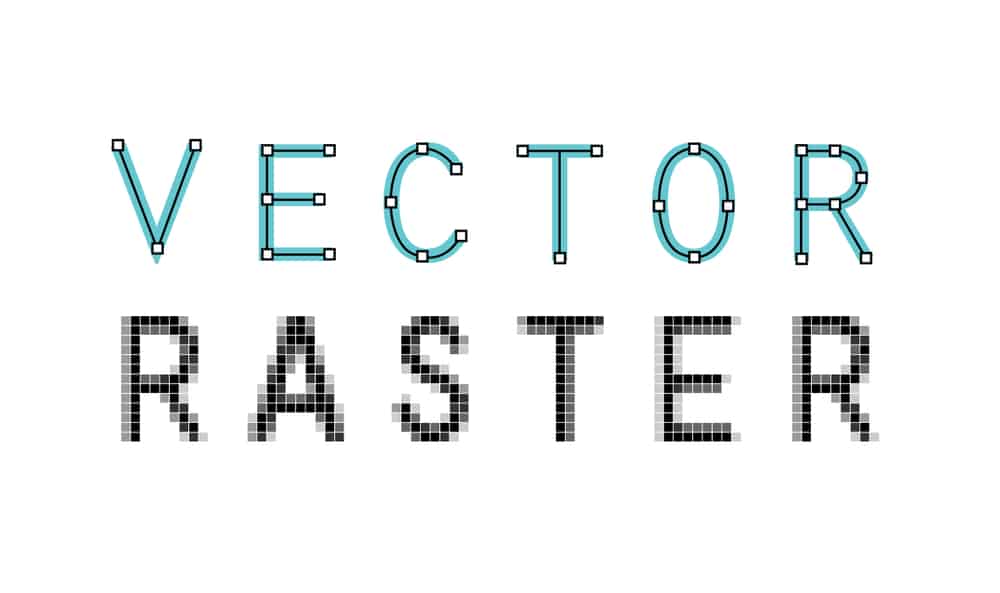
In the world of digital design, the term “vector art” frequently arises, especially for those involved in graphic design and embroidery digitizing. But what exactly is vector art, and why is it so important in the design industry? In this blog, Punch Digitizing will dive deep into the concept, uses, and advantages of vector art, helping you understand its pivotal role in high-quality digital and printed designs. Understanding What is Vector Art So, what is vector art? In simple terms, vector art services refers to a type of digital artwork that is created using mathematical equations. These mathematical formulas define shapes, lines, curves, and colors, allowing the image to be scaled infinitely without losing quality. This difference of raster images (like JPEGs or PNGs), which are made up of pixels and can become blurry or distorted when resized. The beauty of vector art lies in its scalability. Since it’s not based on a fixed number of pixels, you can zoom in or enlarge the artwork to any size, from a small business card to a massive billboard, without any loss of detail or clarity. How Does Vector Art Work? Vector art is created using specialized graphic design software such as Adobe Illustrator, CorelDRAW, or Inkscape. These programs allow designers to build images out of vectors, which are composed of paths. Each path is made up of a start point and an endpoint, connected by lines and curves, which are governed by mathematical equations. The result is a clean, precise image that can be easily edited and manipulated. For example, if you’re designing a company logo in a vector format, you can adjust its size, color, and shape without worrying about pixelation or the loss of image quality. This is particularly useful for businesses that need their logos to be used on various media, from print to web to embroidery. Why is Vector Art Essential for Digitizing Services? As a digitizing services provider like Punch Digitizing, we often work with clients who need their artwork converted into formats suitable for embroidery machines. In this process, vector art plays a crucial role. When converting designs into embroidery formats, clean lines and sharp details are essential for accurate stitching. Since vector art maintains these qualities at any size, it becomes the perfect starting point for the embroidery digitizing process. Without vector images, resizing or manipulating a design can result in loss of detail, jagged edges, and a generally poor-quality final product. By starting with a vector file, we ensure that the embroidery remains sharp and true to the original design, regardless of the size or complexity of the pattern. Common Uses of Vector Art Vector art is widely used in many fields beyond digitizing for embroidery, making it a versatile tool for numerous industries. Here are some common applications: Logo Design Logos need to be highly scalable since they are used across various media. With vector art, a logo can be resized from a business card to a billboard without losing quality. Promotional Materials Flyers, posters, and brochures often require high-resolution graphics. Vector art ensures that these designs can be printed in large formats without any loss of clarity or sharpness. Clothing and Apparel Design Many clothing companies use vector designs for screen printing, embroidery, and other processes. The precision and scalability of vector art make it ideal for transferring designs onto fabric. Web Graphics While websites primarily use raster images, vector art is often employed in the creation of logos, icons, and infographics because it allows for clear, crisp visuals that load quickly and look good on any screen size. Advantages of Using Vector Art Now that you know what vector art is, let’s explore its key advantages: Infinite Scalability One of the most significant benefits of vector art is that it can be scaled to any size without losing quality. Whether it’s shrinking down for a tiny graphic on a website or enlarging it for a large format print, vector images maintain their clarity and detail. Editable Unlike raster images, vector art can be easily edited. You can move, adjust, and change each element of the design without affecting the overall image quality. This flexibility is particularly beneficial for businesses that require regular updates to their designs. Smaller File Size Even though vector files can represent complex images, they typically have smaller file sizes compared to high-resolution raster files. This makes them easier to store, transfer, and upload, without sacrificing quality. Precision Vector art provides precise control over shapes, lines, and colors, making it perfect for detailed designs. This is especially useful in technical drawings, logos, and illustrations where exact dimensions and shapes are crucial. Common Formats of Vector Art When working with vector art, you’ll encounter various file formats. Some of the most common ones include: AI (Adobe Illustrator): A proprietary format used by Adobe Illustrator, which is widely recognized in the design industry. EPS (Encapsulated PostScript): A versatile format used by many design programs, ideal for exporting vector graphics. SVG (Scalable Vector Graphics): A web-friendly format that allows vector images to be displayed on websites without losing quality. PDF (Portable Document Format): While primarily known as a document format, PDFs can also contain vector graphics and are widely used for printing. Conclusion In conclusion, vector art is an invaluable asset in the design world. From logos to promotional materials, its infinite scalability, precision, and ease of editing make it the go-to format for high-quality designs. For businesses like Punch Digitizing, working with vector art ensures that embroidery designs are clean, crisp, and ready for production. Contact Punch Digitizing for professional vector art services. Understanding the importance of vector art and how it fits into digitizing services is essential for creating lasting, high-quality designs. So, the next time you’re considering a logo or graphic design, be sure to ask for it in a vector format—your future self (and embroidery provider) will thank you!

What is a Vector Art? Read More »

difference between raster and vector graphics

What is The Difference Between Raster and Vector Graphics

The main types of online digital graphic images are vector and raster. Very often, people ask what is the differences between raster and vector graphics? We fail to tell them apart and determine which kind is ideal for their projects. An array of pixels of different colors that together form an image is a raster graphic, such as a gif or jpeg. A vector graphic, such as a .eps file or an Adobe Illustrator file, consists of either straight or curved paths, or lines. Let’s Punch Digitizing guide you everything you should know about the difference between raster and vector graphics. Raster graphics Raster graphics are made up of a collection of individual pixels. Each pixel reflects a color, but when they are all combined, they form a well-detailed image. It is possible to equate Raster images with pointillistic paintings that are composed of individual dots forming an entire painted image. Raster images are known as bitmaps as well. One of the biggest benefits of raster images is that it enables editing pixel-by-pixel so that raster images can be used to design very detailed images. In pictures, raster graphics are best used when the smooth transition between shades and colors needs to be illustrated. For catalogs, posters, postcards, stationery, and other daily projects, Raster graphics are outstanding. Even though they tend to look the same, Raster images take up more hard disc space than vector format images. That’s because raster files contain details in the graphic about each pixel. This problem can be mitigated by compression techniques, although these graphics can present you with a challenge if space is a major concern. .bmp, .gif, .jpeg, .jpg, .png, .psd, and .tif are the standard raster graphics file formats. Advantages of raster graphics include: They are quick to use. They include subtle color gradations. Using popular programs such as Photoshop and Microsoft Paint, they are easy to edit. The main drawback of raster graphics is that they are not always accessible for creating high-quality printed projects when the desired end result is large-format. Vector graphics Unlike raster graphics that are composed of pixels that come together and form an image, Vector graphics are composed of paths based on mathematical formulas, hence the name Vector. If you look closely at a vector graphic, just like a child’s connecting the dots game you can see control points with curves between them. Vector graphics are scalable, because the vectors are mathematically defined, and can be blown up to any size without losing any quality or having any of the blurry, pixelated features you see when you zoom in on raster images. For this purpose, vector graphics are suitable for logos and other projects with multiple sizes that need to stay sharp. Complementing vector trace designs that carry simple and solid colors. Moreover, in terms of imitating photos, they are the best option. Although vector images provide some degree of image detail, compared with raster images, they lag behind in terms of intricate detail. The main explanation for this is that vector images consist of shapes and all of them have their own color, so in vector images, it is comparatively more difficult to render images of complex color gradients and shadows than in raster images. Programs like CorelDraw, Illustrator and InkSpace can be used to create and design vector images. Conclusion: Raster images are suitable for simple images, such as photos that express subtle gradations of color, shadow, and light, despite their lack of consistency at larger scales and often unwieldy file sizes. Vector graphics are suitable for scalable projects with fewer colors, despite their inability to make completely seamless color transitions. To cover all of your bases, have your template in all formats or in vector form to be converted later on.

What is The Difference Between Raster and Vector Graphics Read More »

Benefits of Using Custom Embroidery Patches in USA | PunchDigitizing

Benefits of Using Custom Embroidery Patches

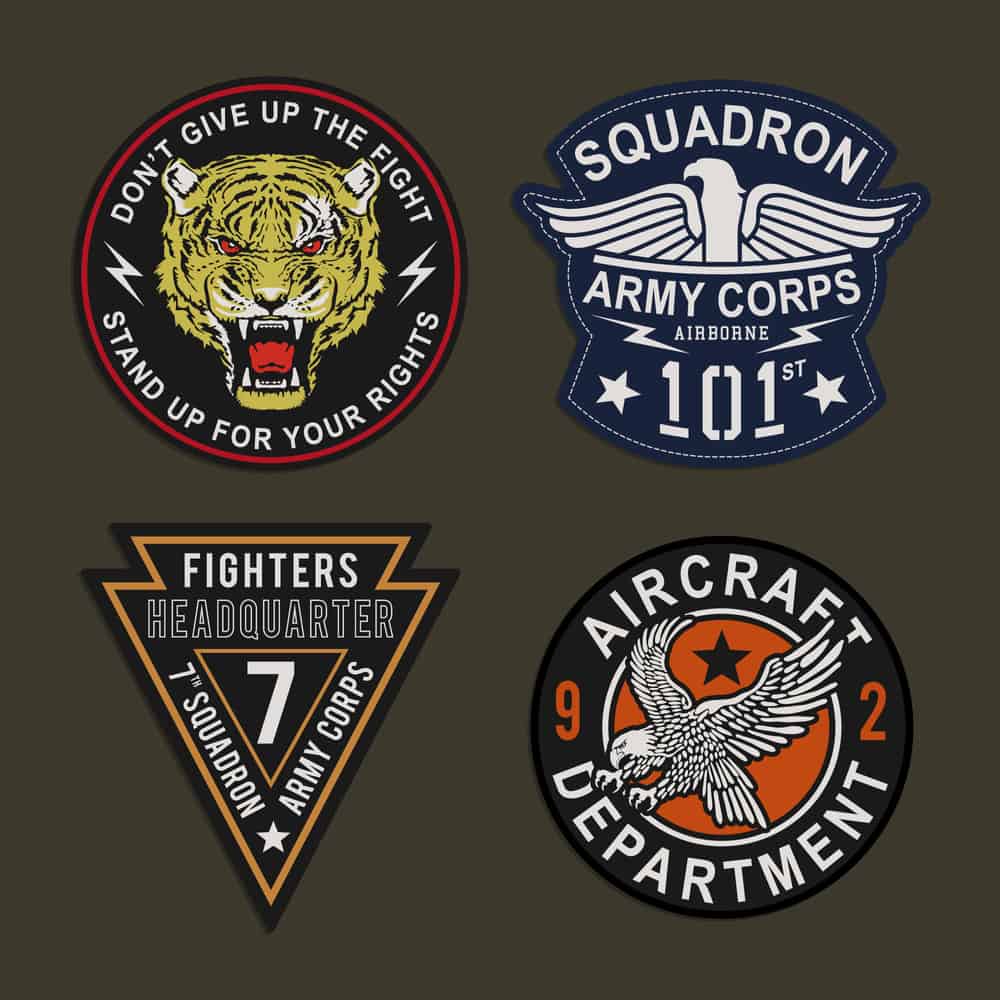
Custom embroidered patches can prove beneficial as a branding solution for an organization when used effectively. This branding medium is very flexible and can help a company stand out and appear more sophisticated and developed. It is possible to attach these custom embroidery patches either with a pin or sewn on. One of the most modern attachment methods is Iron-on backing. The Iron-on backing is the latest solution that is mostly chosen for its simplicity over the other techniques. Not only are these custom logo embroidery patches used in clothing and apparel, but they are also often used as a hat in the application of other items. They are used to draw consumers by giving them a distinctive identity and brand representation for their products so that customers can know who is behind the accomplishment if there is a credit to be awarded for the high-quality product. Here are some benefits of using patches that are custom made: Benefits of Using Custom Embroidery Patches: 1. Cost: Instead of this sort of embroidered patches, you will possibly spend even more on the cost of additional raw material if you use conventional methods. Stitching it on the fabric will also increase the production cost of the product you are producing. This leaves a lower margin for investment gains. You want to make sure that you get high-quality, low-effort, and quick work with minimal expenditure in due time. For those who are trying to run their company under a budget, custom embroidered patches are the best. 2. Professional Look: Custom patches that are embroidered can make uniforms look bolder, refined and professional. They provide personal interaction and also help a lot to build relationships with customers. 3. Company Distinguishes: Custom logo embroidery patches are something searched for by every growing organization searching for better brand representation. If a customer enjoys your product, then you want to let them know that it is your product. This will give your product more exposure and get you more consumers who are looking to purchase your product or buy from your company. These small strategies will help you differentiate the brand from your product and allow it to stand out in the crowd. 4. Multiple Types and Sizes The best thing about these patches is that a variety of styles, shapes and sizes are available. Shirts, sweatshirts, coats, caps or any other type of clothing can be easily added to them. You may also remove them at any time without removing them and allowing the garment to be reused. 5. Sustainable: The last thing your customers would want is to have the logos or patches come off in their working atmosphere when they are doing heavy-duty work, whether in a hospital or a corporate office. The embroidered patch will not come off or become dull, no matter how many times you wash your clothing. 6. Advertising: Any clothing material with a custom patch will provide you with a promotional walking billboard almost instantly while also providing a free advertising mode, making it a very smart and worthwhile investment.

Benefits of Using Custom Embroidery Patches Read More »